
All participant accounts have email two-factor authentication (2FA) enabled by default. 2FA helps keep your account secure and protects your hard-earned incentives.
In this article
What is email 2FA?
Two-factor authentication is a common security measure that helps protect your account. It asks for an additional piece of evidence that the person attempting a log-in is who they say they are.
Email 2FA is triggered by new log-in attempts. We'll send a one-time code to the email address on your account, which you'll need to enter during the log-in process to continue.
Can I opt out of 2FA?
Yes, you can. Keep in mind that opting out reduces the security of your account.
- Go to Edit profile.
- Select Security.
- Uncheck the box to opt out of 2FA.
When will I be asked to verify?
You'll only need to verify when you log in on a new device or 300 days after your last successful log-in.
How do I log in with 2FA enabled?
-

-
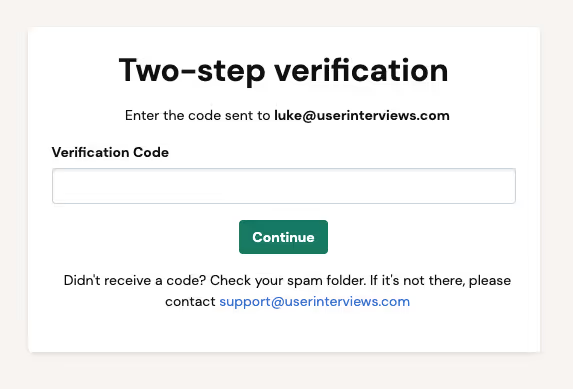
A two-step verification screen will appear, prompting you to enter your verification code.
-
Check your email and spam folder for a message from passwords@userinterviews.com.

- Enter the 6-digit code on the verification screen to complete your log-in.
What if I don't receive the code?
Check your email and spam folder for a message from passwords@userinterviews.com. If you still can't find it, contact our support team.
Why isn't my code working?
The code is one-time use and expires after 30 minutes. If your code has expired, go through the log-in process again to generate a new one.