
We do our best to match you with relevant studies based on your profile. Here are a few ways to find studies that are a better fit and make sure we're sending you the right ones.
In this article
Study notification emails
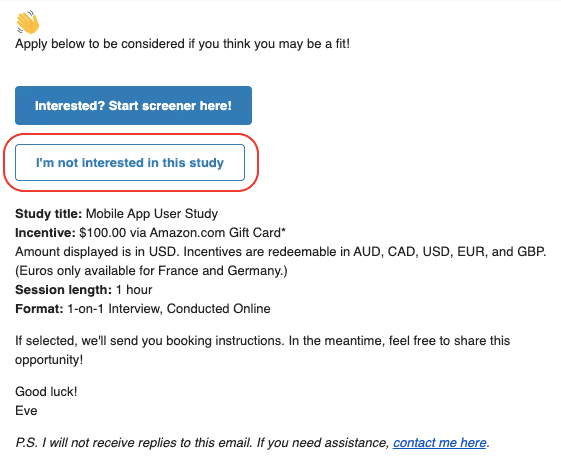
Study notification emails include an I'm not interested in this study button. If you select it, we won't email you about that study again.
If you change your mind and want to apply, go back to the notification email and select Interested? Start screener here!
On the studies page
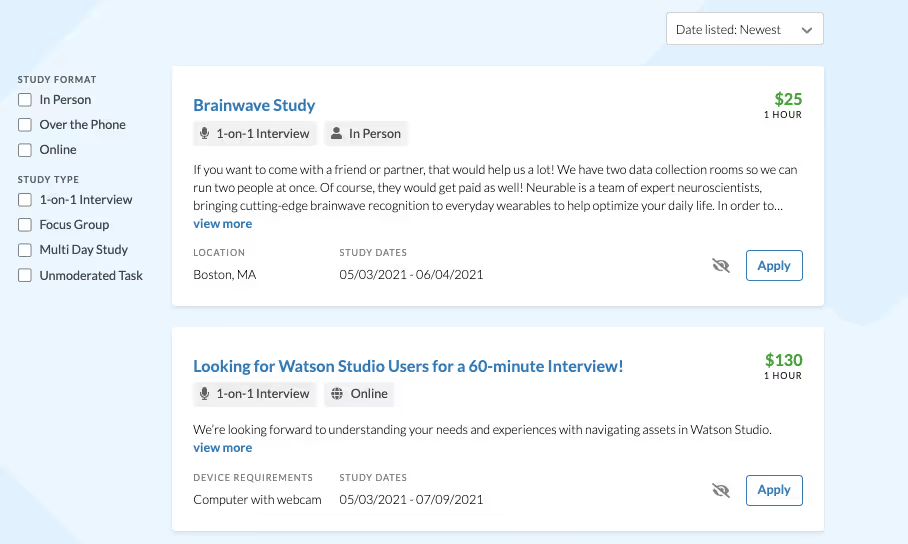
You must be signed in to see studies matched to your demographics and location. By default, studies are shown in chronological order with the newest first. Note that studies are not filtered by job title, industry, interests, hobbies, or past participation.
If you see studies that aren't relevant to you, select the hide studies icon to remove them from your view. Hidden studies are stored in your browser. If you clear your cookies or switch browsers, they may reappear.
Keep your profile current
Your profile directly affects which studies you're matched with. If any of the following have changed, update your profile right away:
- You've moved
- You've changed jobs
- Your employment status has changed
- Your relationship status has changed
- You've had a child
- You've switched smartphone types (for example, Android to iPhone)
- You've recently graduated
- You've started using a different browser
To update your profile, select your name in the top right corner, then select Edit profile from the dropdown.